Scenario:
I need to filter the subgrid to act as view.
Decided to create a custom subgrid view to filter based on all the records in the subgrid.
This is what i code for javascript and put it on onload form function.
Code:
function updateSubGrid() {
var relatedProducts = document.getElementById("SubgridProjects");
var lookupfield = new Array;
lookupfield = Xrm.Page.getAttribute("vw_projectnoid").getValue();
if (lookupfield != null) { var lookupid = lookupfield[0].id; }
else { return; }
if (relatedProducts == null || relatedProducts.readyState != "complete") { setTimeout('updateSubGrid()', 2000); return; }
var fetchXml = "<fetch version='1.0' output-format='xml-platform' mapping='logical' distinct='false'>";
fetchXml += "<entity name='vw_project'>";
fetchXml += "<attribute name='vw_projectid' />";
fetchXml += "<attribute name='vw_projectno' />";
fetchXml += "<attribute name='vw_titlestatus' />";
fetchXml += "<attribute name='vw_landtenure' />";
fetchXml += "<order attribute='vw_projectno' descending='false' />";
fetchXml += "<filter type='and'>";
fetchXml += "<condition attribute='vw_projectid' operator='eq' value='" + lookupid + "' />";
fetchXml += "</filter>";
fetchXml += "</entity>";
fetchXml += "</fetch>";
relatedProducts.control.setParameter("fetchXml", fetchXml);
relatedProducts.control.refresh();
document.getElementById("SubgridProjects_span").disabled = true; //Disable the subgrid
}
As u can c there no layout xml. Most of the custom view use fetch xml. U can download ur fetch xml from advanced find.
CRM 2011 Update/ Custom Subgrid View/ FetchXML Subgrid
0 commentsCRM 2011 *Note Error Message Prompt When Form Save
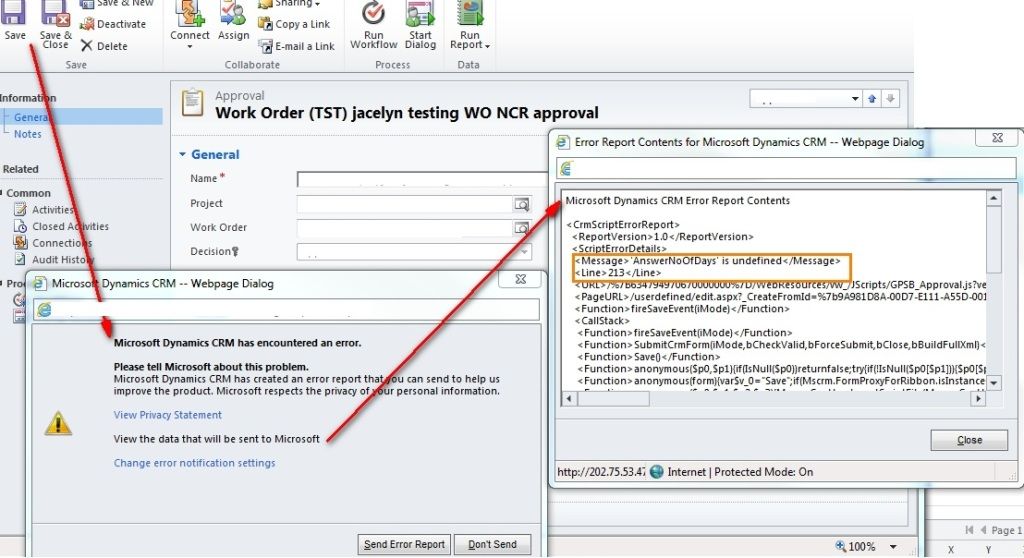
0 comments| I came out with these kind of error once i save my record. |
|
|
| To solve this problem. Open your form script and direct to the line where the problems occur. |
|
|
| 1. I notice that when u are using retrieve function from CRM Restkit to retrieve lookup value you will not get null object. I retrieve one lookup value and the value is object (Eg Exam is lookup but in form field it is empty. If i need to validate the form i need to define which object in exam is null (Eg Exam.Id == null). |
|
|
| 2. When u are using variable make sure u define it well with validate on the value. Some field cant accept string, some cant accept number and more. For my case i forgot to define it as variable and i use it. Once there are no value attached to the variable the error came out when i update. |
|
|
 |
CRM 2011 To Refresh or Reload The Page or Form
0 comments
Im using javascript to reload my page and form.
window.location.reload(true);
it will reload the page but not the parent page. The particular form or page u are at.
CRM 2011 Set Owner Field or ownerid to readonly or disabled
0 comments
If u set the owner field to readonly using form layout, for sure it wont work.
The way that im using is to call javascript function during onload.
Xrm.Page.ui.controls.get("ownerid").setDisabled(true);
//setDisabled is boolen value
It work with the javascript function.
Subscribe to:
Posts (Atom)