
<a
href="www.google.com/?CompanyNumber={!Contact:Company Number;}">Click
Here</a>
Note* Dont copy and paste the links. Manually type in the links.
Result will appear as below:
Click Here <- Sample Cannt Be Click
Showing posts with label CRM 2011. Show all posts
Showing posts with label CRM 2011. Show all posts
CRM Email Template Add Links With Related Field
0 commentsDifferent between managed and unmanaged solutions
0 comments
Un-managed Solutions
- No restriction on what elements of the solution can be customised.
- Difficult to remove components. Entities, fields, web resources etc. have to be manually removed. - - Even if a newer solution version contains an element that has been deleted it will still exist.
- The solution just acts as a container for the components. If you delete the solution the components still exist in the default solution.
- Not possible to lockdown components to prevent accidental or un-intentional changes. (Only for those with customisation rights)
- No restriction on what elements of the solution can be customised.
- Difficult to remove components. Entities, fields, web resources etc. have to be manually removed. - - Even if a newer solution version contains an element that has been deleted it will still exist.
- The solution just acts as a container for the components. If you delete the solution the components still exist in the default solution.
- Not possible to lockdown components to prevent accidental or un-intentional changes. (Only for those with customisation rights)
Managed Solutions
- Can set elements of the solution
such as create views, change field properties, add fields etc.
- Solution cannot be exported.
- Any changes including field removal will happen automatically when changes in new version.
- Can be preventing from damaging your solution.
- Risk of data loss if you remove the solution as all customisations will be removed
- Solution cannot be exported.
- Any changes including field removal will happen automatically when changes in new version.
- Can be preventing from damaging your solution.
- Risk of data loss if you remove the solution as all customisations will be removed
Maintain and Overwrite Customization during Importing
0 comments- Maintain
customizations (recommended): Selecting this option will maintain any
unmanaged customizations performed on components but also implies that
some of the updates included in this solution will not take effect.
- Overwrite
Customizations: Selecting this option overwrites any unmanaged
customizations previously performed on components included in this
solution. All updates included in this solution will take effect.
CRM 2011 Importing Data Limit/ Maximum Importing Data
0 comments
Data Import Wizard Will not upload files past 32mb
Let say if your file is around 200mb in size. The web.config file has the maximum file size in it, so you can edit it to allow for bigger sizes or break the file up into smaller chunks.
Recommended
I prefer to temporarily raise the limits. Note. the data you are importing will takes times.
Default file Location
C:\Program Files\Microsoft Dynamics CRM Data Migration Manager\DMClient\res\web
file web.config
Default data in the file
<?xml version="1.0" encoding="utf-8" ?>
<configuration>
<system.web>
<httpRuntime executionTimeout="1200" maxRequestLength="32768"/>
<compilation defaultLanguage="C#" debug="false">
<assemblies>
<add assembly="Microsoft.Crm, Version=4.0.0.0, Culture=neutral, PublicKeyToken=31bf3856ad364e35"/>
<add assembly="Microsoft.Crm.Sdk, Version=4.0.0.0, Culture=neutral, PublicKeyToken=31bf3856ad364e35"/>
<add assembly="Microsoft.Crm.SdkTypeProxy, Version=4.0.0.0, Culture=neutral, PublicKeyToken=31bf3856ad364e35"/>
<add assembly="Microsoft.Crm.Platform.Sdk, Version=4.0.0.0, Culture=neutral, PublicKeyToken=31bf3856ad364e35"/>
</assemblies>
</compilation>
<authentication mode="Windows" />
<identity impersonate="true" />
</system.web>
</configuration>
I choose to modify maxRequestLength="32768" to be maxRequestLength="300000"
CRM 2011 Microsoft CRM Email Router Service Not Running
0 comments
Step 1 - Run Services.msc
Step 2 - Locate Microsoft CRM Email Router
Step 3 - Start the services
Pro Rate Calculation (Rental And Service Cost)
0 commentsProblem : How does pro rate work for rental.
*Note : Its different from all company.
There are 6 Condition will hit when u do pro rate calculation
1. Rental Start <= Charge Start, Rental Start < Rental End < Charge End.
2. Rental End> Rental Start < Charge End., Rental End >= Charge End.
3. Rental Start <= Charge Start, Rental End >= Charge End.
4. Rental Start > Charge Start, Rental End < Charge End.
5. Rental Start < Charge Start, Rental End = Charge End.
6. Rental Start = Rental End.
Int32 DropdownMonth = 8;
Int32 DropdownYear = 2013;
int32 DaysActualPerMonth = 0;
int32 DaysPerMonth = 0;
// Eg. August bill September Rental
Int32 DaysInMonth = DateTime.DaysInMonth(DropdownYear, DropdownMonth + 1);
DateTime FirstDayOfTheMonth = GetFirstDayOfMonth(DropdownYear, DropdownMonth + 1);
DateTime LastDayOfTheMonth = GetLastDayOfMonth(DropdownYear, DropdownMonth + 1);
DateTime RentalCommenceDate = RentalCostCommenceDate; //Get Rental Commence Date
DateTime RentalDueDate = RentalCostDueDate; // Get Rental Due Date
//ParameterSetDateTime; Equal to previous generation date. May bill invoice date = Invoice date (June Date)
if (RentalCommenceDate <= FirstDayOfTheMonth && RentalDueDate > RentalCommenceDate && RentalDueDate < LastDayOfTheMonth)
{
//Return Partial Rental Amount (A)
DaysActualPerMonth = DaysInMonth;
DaysPerMonth = GetDaysBetweenDates(FirstDayOfTheMonth, RentalDueDate) + 1;
}
else if (RentalCommenceDate > FirstDayOfTheMonth && RentalCommenceDate < LastDayOfTheMonth && RentalDueDate >= LastDayOfTheMonth)
{
//Return Partial Rental Amount (B)
DaysActualPerMonth = DaysInMonth;
DaysPerMonth = GetDaysBetweenDates(RentalCommenceDate, LastDayOfTheMonth) + 1;
}
else if (RentalCommenceDate <= FirstDayOfTheMonth && RentalDueDate >= LastDayOfTheMonth)
{
//Return Full Rental Amount (C)
DaysActualPerMonth = DaysInMonth;
DaysPerMonth = DaysInMonth;
}
else if (RentalCommenceDate > FirstDayOfTheMonth && RentalDueDate > RentalCommenceDate && RentalDueDate < LastDayOfTheMonth)
{
//Return Partial Rental Amount (D)
DaysActualPerMonth = DaysInMonth;
DaysPerMonth = GetDaysBetweenDates(RentalCommenceDate, RentalDueDate) + 1;
}
else if (RentalCommenceDate < FirstDayOfTheMonth && RentalDueDate > RentalCommenceDate && RentalDueDate == LastDayOfTheMonth)
{
//Return Partial Rental Amount (E)
DaysActualPerMonth = DaysInMonth;
DaysPerMonth = 1;
}
else if (RentalCommenceDate == RentalDueDate)
{
//Return Partial Rental Amount = One Day Rental (F)
DaysActualPerMonth = DaysInMonth;
DaysPerMonth = 1;
}
else
{
//Nothing
}
How to Retrieve/Get N:N(Many to Many) Records Using C# && fetchXML
0 comments
Problem with retrieving Many to Many records.
Solution: Using C# fetchxml to retrieve all the information. FetchXML is generated through advance find button in CRM 2011.
Advantage: This fetchXML in C# also can be use in one to many (1:N) records too.
Function And Script
#region Fetch N:N Billing Account Filter By Scheduler
string fetchxml = @"<fetch version='1.0' output-format='xml-platform' mapping='logical' distinct='true'>" +
"<entity name='vw_billingaccountcode'>" +
"<attribute name='vw_billingaccountcodeid' />" +
"<attribute name='vw_name' />" +
"<attribute name='createdon' />" +
"<order attribute='vw_name' descending='false' />" +
"<link-entity name='vw_vw_scheduler_vw_billingaccountcode' from='vw_billingaccountcodeid' to='vw_billingaccountcodeid' visible='false' intersect='true'>" +
"<link-entity name='vw_scheduler' from='vw_schedulerid' to='vw_schedulerid' alias='aa'>" +
"<filter type='and'>" +
"<condition attribute='vw_schedulerid' operator='eq' uiname='Test' uitype='vw_scheduler' value='{" + ID.ToUpper() + "}' />" +
"</filter>" +
"</link-entity>" +
"</link-entity>" +
"</entity>" +
"</fetch>";
EntityCollection entities = OrgService.RetrieveMultiple(new FetchExpression(fetchxml));
foreach (Entity result in entities.Entities)
{
string BillingAccountId = result.Id.ToString(); //All the result will be show here. Looping.
}
#endregion
CRM 2011 Sales Literature Add Attachment
0 comments
How you add attachment from Sales Literature ?
Sales Literature Entity -> Sales Attachment -> Add New Attachment -> Attach Video,Photo and Others.
CRM 2011 Related Entity Numbering/ Calculate Amount Of Related Entity Records
0 commentsProblem: -I need to c amount of related entity B tied to parent entity A. -1 Entity A : Many Entity B -Need auto numbering on amount of related record (entity B) tied to entity A. |
Solution: -Add function during onLoad(); -Add one ref javascript Name Navi_AutoNumber.js |
eg. onLoad Script function onLoad() { GetAssociatedRecords("Entity B Name", "Entity B Look Up Field Scheme Name", "Relation Name"); } |
eg. Navi_AutoNumber.js function GetAssociatedRecords(associatedEntityName, primaryIdSchemaName, relationshipSchemaName){ try{ if(Xrm.Page.data.entity.getId() != null){ var bProceed = false; var nav = 'nav_' + relationshipSchemaName; var items = Xrm.Page.ui.navigation.items.get(); for (var i in items) { var item = items[i]; if(item.getId().toLowerCase() == nav.toLowerCase()){ bProceed = true; break; } } if(bProceed){ var relationshipIdvalue = Xrm.Page.data.entity.getId(); var columns = []; var Filter = primaryIdSchemaName + "/Id eq (guid'" + relationshipIdvalue + "')" var Collection = CrmRestKit.RetrieveMultiple(associatedEntityName, columns, Filter); var totalRecords = Collection.results.length; if(document.getElementById(nav) != null) { document.getElementById(nav).getElementsByTagName('NOBR')[0].innerText = " (" + totalRecords + ")" + document.getElementById(nav).getElementsByTagName('NOBR')[0].innerText ; } //return Collection; } } }catch(err){ alert(err); } } |
How it will look Like 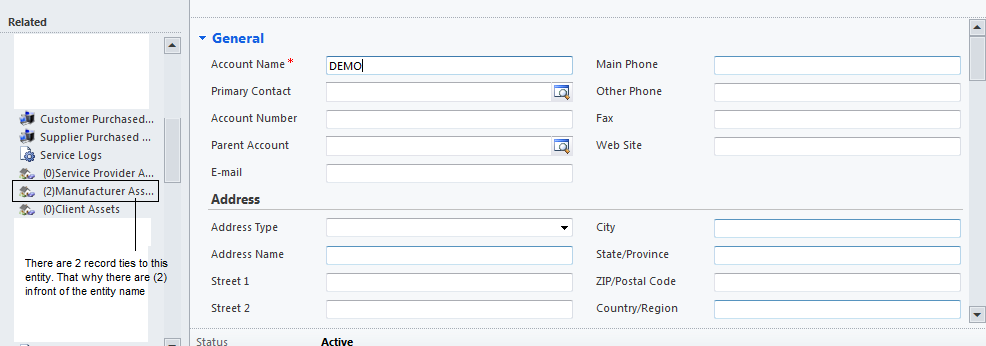 |
CRM 2011 CrmEncodeDecode is Undefined
0 comments
Problem:
CrmEncodeDecode is Undefined
Solution:
parent.CrmEncodeDecode.CrmXmlEncode(sFetchXml);
I put parent infront of CrmEncodeDecode because im using it in webpage and i need to call
parent page only i can load the CrmEncodeDecode.
Webpage act as a child for a record form.That mean every webpage if u need to use the field value,
there need to put parent infront of all the crm code.
eg. parent.Xrm.Page.data.entity.attributes("fieldname").getValue();
CRM 2011 Webpage To Auto Play Video Link/ Youtube Video Link
0 comments
*Note Using HTML code In Webpage
<HTML><HEAD>
<META charset=utf-8></HEAD>
<BODY contentEditable=true>
<IFRAME class=youtube-player style="width:100%;height:100%" src="youtubelinks?wmode=opaque&autoplay=1&enablejsapi=1" frameBorder=0 type="text/html"></IFRAME>
</BODY></HTML>
autoplay = to configure once onload to play the video or not
CRM 2011 Refresh Webpage
0 comments
.eg Javascript
var wrControl = Xrm.Page.ui.controls.get("Webresource_WebpageName");
wrControl.setSrc(wrControl.getSrc());
CRM 2011 Refresh SubGrid
0 comments
eg. Javascript
gridControl = Xrm.Page.ui.controls.get("SubGrid_Name");
gridControl.refresh();
CRM 2011 Button To Open New Page
0 comments
Problem:
How do i write html in javascript and open the webpage.
Solution:
eg. Javascript
function newPage(){
var newWin = open('url','_blank','fullscreen=yes,directories=no,menubar=no,location=no,toolbar=no,status=no,scrollbars=yes,resizable=yes');
newWin.document.open();
newWin.document.write('<HTML>');
newWin.document.write('<HEAD>');
newWin.document.write('<style type="text/css">');
newWin.document.write('#map {');
newWin.document.write('height: 100%;');
newWin.document.write('width: 100%;');
newWin.document.write('border: 1px solid #000;');
newWin.document.write('}');
newWin.document.write('</style>');
newWin.document.write('</HEAD>');
newWin.document.write('<BODY>');
newWin.document.write('<iframe id="map" frameborder="0" scrolling="no" marginheight="0" marginwidth="0" src="http://www.google.com&output=embed"></iframe>');
newWin.document.write('</BODY>');
newWin.document.write('</HTML>');
newWin.document.close();
}
Call these function under any trigger point. As for me i used it under onclick event from a button.
CRM 2011 Add JScript into Button Event JScript
0 comments
Problem:
I created a custom ribbon button. The button added with onclick event function eg. GenerateNumbering.
The problem is i need to add another Javascript as Ref toward another javascript.
I used Visual Ribbon Editor to edit and create the custom button and only one Javascript can be insert into it.
That mean i cant call another javascript as reference.
Solution:
I Created a solution with the entity that i need to customize the ribbon button.
Export out the solution and edit the customization by adding in some javascript to call.
Eg.
Editing the xml in these section
<CommandDefinition Id="vwork.SubGrid.vw_outlet.MainTab.Layout.GenerateRoute.Command">
<EnableRules />
<DisplayRules />
<Actions>
<JavaScriptFunction FunctionName="isNaN" Library="$webresource:YourScriptName" />
<JavaScriptFunction FunctionName="isNaN" Library="$webresource:YourScriptName" />
<JavaScriptFunction FunctionName="isNaN" Library="$webresource:YourScriptName" />
<JavaScriptFunction Library="$webresource:YourScriptName" FunctionName="GenerateNumbering"/>
</Actions>
</CommandDefinition>
Save the customization xml, zipped it and import it back to the organization.
You can now call different function in other javascript u included above.
Thanks.
Hope my solution helps
CRM 2011 Retrieve Related Record SelectedID from SubGrid
0 comments
Problem:
How to retrieve the selected record from related entities subgrid ?
I wan to use a button to get all the selected record id.
Solve Method:
1. Create one button to call java script upon clicked.
eg.
function GenerateRoute(AllSelectedId) { debugger; var Answer = AllSelectedId; }
2. Import and export out solution and modify the solution customization.
Adding "<CrmParameter Value="SelectedControlSelectedItemIds" /> " under Javascript XML.
<Actions>
<JavaScriptFunction Library="$webresource:Route.js" FunctionName="Generate" >
<CrmParameter Value="SelectedControlSelectedItemIds" />
</JavaScriptFunction>
</Actions>
4. Final Generate and get the result. All the selected record from related entities subgrid are retrieve.
eg Javascript function
function Generate(AllSelectedId) { }
all the selected id will populate into AllSelectedId as array.
Thanks. Hope my solution helps
CRM 2011 Refreshing a Web Resource/Webpage On A Form
0 comments
I have problem with refreshing a custom webpage.
Below will be the function i use to refresh the webpage on particular trigger point.
var someOnchangeEvent = function(){
var wrControl = Xrm.Page.ui.controls.get("nameofwebresoucecontrol");
wrControl.setSrc(wrControl.getSrc());
}
CRM 2011 Get Organization ID
0 comments
Using SQL Server Management Studio.
Create new query as below:
Select * from MSCRM_CONFIG..Organization
CRM 2011 Get Dropdown Value/ Dropdown Text
0 comments
Below is the script to retrieve dropdown value and text.
To get text
Xrm.Page.data.entity.attributes.get("vw_facilitiestype").getSelectedOption().text
Xrm.Page.data.entity.attributes.get("vw_facilitiestype").getText()
To get value
Xrm.Page.data.entity.attributes.get("vw_facilitiestype").getSelectedOption().value
Xrm.Page.data.entity.attributes.get("vw_facilitiestype").getValue();
Subscribe to:
Posts (Atom)