Script:
function My_PreventSaveFunction(eContext, Message) {
alert(Message);
eContext.getEventArgs().preventDefault();
}
Showing posts with label Javascript. Show all posts
Showing posts with label Javascript. Show all posts
CRM 2013 Javascript Block Save
0 commentsCRM 2013 Javascript Filter Custom Lookup View Field (PreFiltering Method)
0 comments
Issues:
Changes in category effect custom filtering, then the lookup display on form will corrupt but when u click on lookup more its ok.
Script:
var filter = '';
function FilterListingViewCategory(Value) {
filter = "<filter type='and'>" +
"<condition attribute='statecode' operator='eq' value='0' />" +
"<condition attribute='vwlzs_category' operator='in'>" +
"<value>" + RegistrationId + "</value>" +
"</condition>" +
"</filter>";
preFilterLookupCategory(filter);
}
function preFilterLookupCategory(filter) {
Xrm.Page.getControl("vwlzs_aidcategorylk").addPreSearch(function () {
addLookupFilterCategory(filter);
});
}
function addLookupFilterCategory(filter) {
Xrm.Page.getControl("vwlzs_aidcategorylk").addCustomFilter(filter);
}
CRM 2013 Javascript Filter Custom Lookup View Field (FetchXML)
0 comments
Issues:
This part doesn't work when user click on lookup for more because i'm unable to set the default view fo the lookup. The user need to select the custom view by their own.
Script:
function FilterListingViewAidCategory(Value) {
var RegistrationId = Xrm.Page.getAttribute("vwlzs_asnafcategory").getValue();
if (RegistrationId == null && Value != null) {
RegistrationId == Value;
}
var entityNumber = GetObjectTypeCode("vwlzs_aidsapplication");
var FetchXML = "<fetch version='1.0' output-format='xml-platform' mapping='logical' distinct='false'>" +
"<entity name='vwlzs_category'>" +
"<attribute name='vwlzs_categoryid' />" +
"<attribute name='vwlzs_name' />" +
"<attribute name='createdon' />" +
"<order attribute='vwlzs_name' descending='false' />" +
"<filter type='and'>" +
"<condition attribute='statecode' operator='eq' value='0' />" +
"<condition attribute='vwlzs_categoryasnaf' operator='in'>" +
"<value>" + RegistrationId + "</value>" +
"</condition>" +
"</filter>" +
"</entity>" +
"</fetch>";
var layoutXml = "<grid name='resultset' object='10038' jump='vwlzs_name' select='1' preview='1' icon='1'>" +
"<row name='result' id='vwlzs_categoryid'>" +
"<cell name='vwlzs_name' width='300' />" +
"<cell name='createdon' width='150' />" +
"</row>" +
"</grid>";
var viewId = guid();
var viewDisplayName = "Filtered Based On Category";
Xrm.Page.getControl("vwlzs_aidcategorylk").addCustomView(viewId, "vwlzs_category", viewDisplayName, FetchXML, layoutXml, true);
}
CRM 2013 Javascript Check CRM User Role in System
0 comments
Script:
function CheckorNotInterBranch() {
var EntityId = Xrm.Page.ui.getFormType();
if (EntityId == 1) {
//Security.UserInRole.checkUserInRole(["HQ Staff", "System Customizer", "Custom Role Name"], function () {
Security.UserInRole.checkUserInRole(["HQ Staff"], function () {
//alert("valid"); // The user is in one of the specifed roles.
Xrm.Page.getAttribute("vwlzs_interbranch").setValue(true);
},
function () {
//alert("invalid"); // The user is not in one of the specifed roles.
Xrm.Page.getAttribute("vwlzs_interbranch").setValue(false);
});
}
//check new form
// Check user role when user role = HQ Staff then inter branch = yes
//var UserRoles = Xrm.Page.context.getUserRoles();
// Check User role when user role = branch staff then inter branch = no
}
//If the Security namespace object is not defined, create it.
if (typeof (Security) == "undefined")
{ Security = {}; }
// Create Namespace container for functions in this library;
if (typeof (Security.UserInRole) == "undefined") {
Security.UserInRole = {
isInRole: null,
roleIdValues: [],
validFunction: null,
invalidFunction: null,
checkRoles: [],
checkUserInRole: function (roles, validFunc, invalidFunc) {
validFunction = validFunc;
invalidFunction = invalidFunc;
checkRoles = roles;
Security.UserInRole.getAllowedSecurityRoleIds();
},
getAllowedSecurityRoleIds: function () {
var filter = "";
for (var i = 0; i < checkRoles.length; i++) {
if (filter == "") {
filter = "Name eq '" + checkRoles[i] + "'";
}
else {
filter += " or Name eq '" + checkRoles[i] + "'";
}
}
Security.UserInRole.querySecurityRoles("?$select=RoleId,Name&$filter=" + filter);
},
validateSecurityRoles: function () {
switch (Security.UserInRole.isInRole) {
//If the user has already been discovered in role then call validFunc
case true:
validFunction.apply(this, []);
break;
default:
var userRoles = Xrm.Page.context.getUserRoles();
for (var i = 0; i < userRoles.length; i++) {
var userRole = userRoles[i];
for (var n = 0; n < Security.UserInRole.roleIdValues.length; n++) {
var role = Security.UserInRole.roleIdValues[n];
if (userRole.toLowerCase() == role.toLowerCase()) {
Security.UserInRole.isInRole = true;
// Call function when role match found
validFunction.apply(this, []);
return true;
}
}
}
// Call function when no match found
invalidFunction.apply(this, []);
break;
}
},
querySecurityRoles: function (queryString) {
var req = new XMLHttpRequest();
var url = "";
// Try getClientUrl first (available post Rollup 12)
if (Xrm.Page.context.getClientUrl) {
url = Xrm.Page.context.getClientUrl();
}
else {
url = Xrm.Page.context.getServerUrl();
}
req.open("GET", url + "/XRMServices/2011/OrganizationData.svc/RoleSet" + queryString, true);
req.setRequestHeader("Accept", "application/json");
req.setRequestHeader("Content-Type", "application/json; charset=utf-8");
req.onreadystatechange = function () {
if (this.readyState == 4 /* complete */) {
req.onreadystatechange = null; //Addresses memory leak issue with IE.
if (this.status == 200) {
var returned = window.JSON.parse(this.responseText).d;
for (var i = 0; i < returned.results.length; i++) {
Security.UserInRole.roleIdValues.push(returned.results[i].RoleId);
}
if (returned.__next != null) {
//In case more than 50 results are returned.
// This will occur if an organization has more than 16 business units
var queryOptions = returned.__next.substring((url + "/XRMServices/2011/OrganizationData.svc/RoleSet").length);
Security.UserInRole.querySecurityRoles(queryOptions);
}
else {
//Now that the roles have been retrieved, try again.
Security.UserInRole.validateSecurityRoles();
}
}
else {
var errorText;
if (this.status == 12029)
{ errorText = "The attempt to connect to the server failed."; }
if (this.status == 12007)
{ errorText = "The server name could not be resolved."; }
try {
errorText = window.JSON.parse(this.responseText).error.message.value;
}
catch (e)
{ errorText = this.responseText }
}
}
};
req.send();
},
__namespace: true
};
}
CRM 2013 Javascript Disable form.
0 comments
Script:
disableFormFields = function (onOff) {
Xrm.Page.ui.controls.forEach(function (control, index) {
if (doesControlHaveAttribute(control)) {
control.setDisabled(onOff);
}
});
} //Function to disable all the field in the form// true/false
doesControlHaveAttribute = function (control) {
var controlType = control.getControlType();
return controlType != "iframe" && controlType != "webresource" && controlType != "subgrid";
} //Sub disableFormFields// Check the form have control like iframe, webresource or subgrid
function onload() {
disableFormFields(true);
}
CRM 2013 Javascript Calculate Age Based On Date of Birth
0 comments
Script:
function CalculateAge() {
var DOB = Xrm.Page.getAttribute("vwlzs_dateofbirth").getValue();
var todadate = new Date();
if (DOB < todadate) {
if (DOB != null) {
var d = new Date();
var n = d.getFullYear();
var TotalAge = n - DOB.getFullYear();
Xrm.Page.getAttribute("vwlzs_age").setValue(parseInt(TotalAge));
}
else {
Xrm.Page.getAttribute("vwlzs_age").setValue(null);
}
}
else {
alert("No future date allow!");
}
}
CRM 2013 Javascript Populate Date of Birth and Age from NRIC/MyKad
0 comments
Script:
function PopulateDateofBirthAndAge(NRICValue) {
var var1 = value.substring(0, 2);
var var2 = value.substring(2, 4);
var var3 = value.substring(4, 6);
var d = new Date();
d.setDate(var3);
d.setMonth(var2);
d.setYear(var1);
NRIC_TextInput(value, var1, var2, var3);
}
function NRIC_TextInput(id, yearid, monthid, dayid) {
var value = id;
if (value && value.length == 12) {
var isValid = true;
var n = value.split("");
var Year = parseFloat("20" + n[0] + n[1]);
var Month = parseFloat(n[2] + n[3]);
var Day = parseFloat(n[4] + n[5]);
var Now = new Date();
var Age = 0;
var sMonth = "";
if (Month < 1 || Month > 12) isValid = false;
if (isValid) {
if (Year > Now.getFullYear()) {
Year = Year - 100;
//Age check on month and date reach ?
Age = Now.getFullYear() - Year;
}
else {
//Age check on month and date reach ?
Age = Now.getFullYear() - Year;
}
switch (Month) {
case 1:
sMonth = "January";
if (Day > 31 || Day <= 0) isValid = false;
break;
case 2:
sMonth = "February";
if (Year % 4 == 0) {
if (Day > 29 || Day <= 0) isValid = false;
} else {
if (Day > 28 || Day <= 0) isValid = false;
}
break;
case 3:
sMonth = "March";
if (Day > 31 || Day <= 0) isValid = false;
break;
case 4:
sMonth = "April";
if (Day > 30 || Day <= 0) isValid = false;
break;
case 5:
sMonth = "May";
if (Day > 31 || Day <= 0) isValid = false;
break;
case 6:
sMonth = "June";
if (Day > 30 || Day <= 0) isValid = false;
break;
case 7:
sMonth = "July";
if (Day > 31 || Day <= 0) isValid = false;
break;
case 8:
sMonth = "August";
if (Day > 31 || Day <= 0) isValid = false;
break;
case 9:
sMonth = "September";
if (Day > 30 || Day <= 0) isValid = false;
break;
case 10:
sMonth = "October";
if (Day > 31 || Day <= 0) isValid = false;
break;
case 11:
sMonth = "November";
if (Day > 30 || Day <= 0) isValid = false;
break;
case 12:
sMonth = "December";
if (Day > 31 || Day <= 0) isValid = false;
break;
default:
isValid = false;
break;
}
}
if (isValid) {
Xrm.Page.getAttribute("vwlzs_age").setValue(Age);
var DOB = new Date(Year, monthid - 1, dayid, 0, 0, 0);
Xrm.Page.getAttribute("vwlzs_dateofbirth").setValue(DOB);
} else {
alert("Invalid NRIC Number.");
}
}
else {
alert("Invalid NRIC Number.");
}
}
CRM 2013 Javascript Define Gender Through NRIC/MyKad
0 comments
Script:
function DefineMaleFemale() {
var NRIC = Xrm.Page.getAttribute("vwlzs_identificationnum").getValue();
if (NRIC != null) {
var last = NRIC.charAt(NRIC.length - 1);
if (isEven(last) == true) {
Xrm.Page.getAttribute("vwlzs_gender").setValue(true); //Female
}
else {
Xrm.Page.getAttribute("vwlzs_gender").setValue(false); //Male
}
}
}
function isEven(value) {
if (value % 2 == 0)
return true;
else
return false;
}
CRM 2013 Javascript Refresh form
0 comments
Script:
function TriggerSubmit() {
Xrm.Page.data.save().then(successCallback, errorCallback);
}
function successCallback() {
Xrm.Page.data.setFormDirty(false);
var Id = Xrm.Page.data.entity.getId();
Xrm.Utility.openEntityForm("vwlzs_register", Id);
}
function errorCallback(attr1, attr2) {
}
CRM 2013 Javacript Validate Integer
0 comments
Script:
function CheckInteger(Field) {
var Result = Xrm.Page.getAttribute(Field).getValue();
if (isInt(Result)) {
Xrm.Page.getAttribute(Field).setValue(Result);
}
else {
alert("Input is not numeric")
Xrm.Page.getAttribute(Field).setValue(null);
}
}
function isInt(value) {
return !isNaN(value) && parseInt(Number(value)) == value && !isNaN(parseInt(value, 10));
}
CRM 2013 Javascript Validate Symbol
0 comments
Script:
function validateSymbol(Field) {
var TCode = Xrm.Page.getAttribute(Field).getValue();
if (/[^a-zA-Z0-9\-\/]/.test(TCode)) {
alert("Input is not alphanumeric");
Xrm.Page.getAttribute(Field).setValue(null);
}
}
CRM 2013 Remove all the subgrid add button
0 comments
Call it during On load (with certain condition) then all the sub grid add button in the form will be hidden.
Script:
var intervalId;
function makeReadOnly() {
try {
var subgridsLoaded = false;
Xrm.Page.ui.controls.get().forEach(function (control, index) {
if (control.setDisabled && Xrm.Page.ui.getFormType() != 3) {
control.setDisabled(true);
}
else {
// removeAddButtonFromSubGrid(control);
// subgridsLoaded = true;
}
});
if ($("div[id$='_crmGridTD']").length > 0 && !subgridsLoaded) {
intervalId = setInterval(function () {
var subgridsArr = Xrm.Page.getControl(function (control, index) {
return control.getControlType() == 'subgrid';
});
subgridsArr.forEach(function (control, index) {
removeButtonsFromSubGrid(control);
});
}, 500);
}
}
catch (e) {
alert("makeReadOnly() Error: " + e.message);
}
}
function removeButtonsFromSubGrid(subgridControl) {
if (intervalId) {
$('#' + subgridControl.getName() + '_addImageButton').css('display', 'none');
$('#' + subgridControl.getName() + '_openAssociatedGridViewImageButton').css('display', 'none');
clearInterval(intervalId);
}
}
Pro Rate Calculation (Rental And Service Cost)
0 commentsProblem : How does pro rate work for rental.
*Note : Its different from all company.
There are 6 Condition will hit when u do pro rate calculation
1. Rental Start <= Charge Start, Rental Start < Rental End < Charge End.
2. Rental End> Rental Start < Charge End., Rental End >= Charge End.
3. Rental Start <= Charge Start, Rental End >= Charge End.
4. Rental Start > Charge Start, Rental End < Charge End.
5. Rental Start < Charge Start, Rental End = Charge End.
6. Rental Start = Rental End.
Int32 DropdownMonth = 8;
Int32 DropdownYear = 2013;
int32 DaysActualPerMonth = 0;
int32 DaysPerMonth = 0;
// Eg. August bill September Rental
Int32 DaysInMonth = DateTime.DaysInMonth(DropdownYear, DropdownMonth + 1);
DateTime FirstDayOfTheMonth = GetFirstDayOfMonth(DropdownYear, DropdownMonth + 1);
DateTime LastDayOfTheMonth = GetLastDayOfMonth(DropdownYear, DropdownMonth + 1);
DateTime RentalCommenceDate = RentalCostCommenceDate; //Get Rental Commence Date
DateTime RentalDueDate = RentalCostDueDate; // Get Rental Due Date
//ParameterSetDateTime; Equal to previous generation date. May bill invoice date = Invoice date (June Date)
if (RentalCommenceDate <= FirstDayOfTheMonth && RentalDueDate > RentalCommenceDate && RentalDueDate < LastDayOfTheMonth)
{
//Return Partial Rental Amount (A)
DaysActualPerMonth = DaysInMonth;
DaysPerMonth = GetDaysBetweenDates(FirstDayOfTheMonth, RentalDueDate) + 1;
}
else if (RentalCommenceDate > FirstDayOfTheMonth && RentalCommenceDate < LastDayOfTheMonth && RentalDueDate >= LastDayOfTheMonth)
{
//Return Partial Rental Amount (B)
DaysActualPerMonth = DaysInMonth;
DaysPerMonth = GetDaysBetweenDates(RentalCommenceDate, LastDayOfTheMonth) + 1;
}
else if (RentalCommenceDate <= FirstDayOfTheMonth && RentalDueDate >= LastDayOfTheMonth)
{
//Return Full Rental Amount (C)
DaysActualPerMonth = DaysInMonth;
DaysPerMonth = DaysInMonth;
}
else if (RentalCommenceDate > FirstDayOfTheMonth && RentalDueDate > RentalCommenceDate && RentalDueDate < LastDayOfTheMonth)
{
//Return Partial Rental Amount (D)
DaysActualPerMonth = DaysInMonth;
DaysPerMonth = GetDaysBetweenDates(RentalCommenceDate, RentalDueDate) + 1;
}
else if (RentalCommenceDate < FirstDayOfTheMonth && RentalDueDate > RentalCommenceDate && RentalDueDate == LastDayOfTheMonth)
{
//Return Partial Rental Amount (E)
DaysActualPerMonth = DaysInMonth;
DaysPerMonth = 1;
}
else if (RentalCommenceDate == RentalDueDate)
{
//Return Partial Rental Amount = One Day Rental (F)
DaysActualPerMonth = DaysInMonth;
DaysPerMonth = 1;
}
else
{
//Nothing
}
Closing Webpage Without Prompt
0 comments
Add Javascript to webpage
function AssignContent()
{
window.open('', '_self', '');
window.close();
}
Add C# code at webpage aspx page.
protected void Page_Load(object sender, EventArgs e)
{
if (!IsPostBack)
{
if (!ClientScript.IsClientScriptBlockRegistered("k1"))
{
ClientScript.RegisterClientScriptBlock(this.GetType(), "k1", "<script language='javascript'>AssignContent();</script>");
}
}
}
During form onload the webpage will close.
CRM 2011 Related Entity Numbering/ Calculate Amount Of Related Entity Records
0 commentsProblem: -I need to c amount of related entity B tied to parent entity A. -1 Entity A : Many Entity B -Need auto numbering on amount of related record (entity B) tied to entity A. |
Solution: -Add function during onLoad(); -Add one ref javascript Name Navi_AutoNumber.js |
eg. onLoad Script function onLoad() { GetAssociatedRecords("Entity B Name", "Entity B Look Up Field Scheme Name", "Relation Name"); } |
eg. Navi_AutoNumber.js function GetAssociatedRecords(associatedEntityName, primaryIdSchemaName, relationshipSchemaName){ try{ if(Xrm.Page.data.entity.getId() != null){ var bProceed = false; var nav = 'nav_' + relationshipSchemaName; var items = Xrm.Page.ui.navigation.items.get(); for (var i in items) { var item = items[i]; if(item.getId().toLowerCase() == nav.toLowerCase()){ bProceed = true; break; } } if(bProceed){ var relationshipIdvalue = Xrm.Page.data.entity.getId(); var columns = []; var Filter = primaryIdSchemaName + "/Id eq (guid'" + relationshipIdvalue + "')" var Collection = CrmRestKit.RetrieveMultiple(associatedEntityName, columns, Filter); var totalRecords = Collection.results.length; if(document.getElementById(nav) != null) { document.getElementById(nav).getElementsByTagName('NOBR')[0].innerText = " (" + totalRecords + ")" + document.getElementById(nav).getElementsByTagName('NOBR')[0].innerText ; } //return Collection; } } }catch(err){ alert(err); } } |
How it will look Like 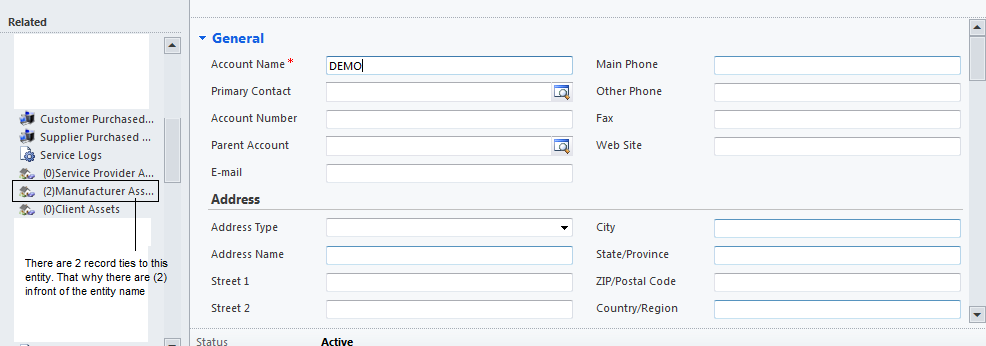 |
CRM 2011 CrmEncodeDecode is Undefined
0 comments
Problem:
CrmEncodeDecode is Undefined
Solution:
parent.CrmEncodeDecode.CrmXmlEncode(sFetchXml);
I put parent infront of CrmEncodeDecode because im using it in webpage and i need to call
parent page only i can load the CrmEncodeDecode.
Webpage act as a child for a record form.That mean every webpage if u need to use the field value,
there need to put parent infront of all the crm code.
eg. parent.Xrm.Page.data.entity.attributes("fieldname").getValue();
CRM 2011 Webpage To Auto Play Video Link/ Youtube Video Link
0 comments
*Note Using HTML code In Webpage
<HTML><HEAD>
<META charset=utf-8></HEAD>
<BODY contentEditable=true>
<IFRAME class=youtube-player style="width:100%;height:100%" src="youtubelinks?wmode=opaque&autoplay=1&enablejsapi=1" frameBorder=0 type="text/html"></IFRAME>
</BODY></HTML>
autoplay = to configure once onload to play the video or not
CRM 2011 Refresh Webpage
0 comments
.eg Javascript
var wrControl = Xrm.Page.ui.controls.get("Webresource_WebpageName");
wrControl.setSrc(wrControl.getSrc());
CRM 2011 Refresh SubGrid
0 comments
eg. Javascript
gridControl = Xrm.Page.ui.controls.get("SubGrid_Name");
gridControl.refresh();
CRM 2011 Button To Open New Page
0 comments
Problem:
How do i write html in javascript and open the webpage.
Solution:
eg. Javascript
function newPage(){
var newWin = open('url','_blank','fullscreen=yes,directories=no,menubar=no,location=no,toolbar=no,status=no,scrollbars=yes,resizable=yes');
newWin.document.open();
newWin.document.write('<HTML>');
newWin.document.write('<HEAD>');
newWin.document.write('<style type="text/css">');
newWin.document.write('#map {');
newWin.document.write('height: 100%;');
newWin.document.write('width: 100%;');
newWin.document.write('border: 1px solid #000;');
newWin.document.write('}');
newWin.document.write('</style>');
newWin.document.write('</HEAD>');
newWin.document.write('<BODY>');
newWin.document.write('<iframe id="map" frameborder="0" scrolling="no" marginheight="0" marginwidth="0" src="http://www.google.com&output=embed"></iframe>');
newWin.document.write('</BODY>');
newWin.document.write('</HTML>');
newWin.document.close();
}
Call these function under any trigger point. As for me i used it under onclick event from a button.
Subscribe to:
Posts (Atom)